For a lot of people, making music still feels like entering the wrong room. Traditional software often assumes you already know arrangement, sound selection, vocal direction, and structure before the first note exists. What makes AI Music Generator interesting is that it starts from a different assumption: many creators do not begin with a polished demo. They begin with an idea, a mood, a line of lyrics, or a use case, and they need a system that can translate that starting point into something audible.
That shift matters because it changes the first creative decision. Instead of opening a project and facing dozens of technical choices, you begin by describing what you want or by supplying lyrics. On ToMusic, the platform then routes that intent through a set of models, modes, and output options that are visible on the site itself. In my reading of the product flow, the appeal is not that it removes creativity, but that it relocates creativity to a more accessible place: language.
How ToMusic Reframes The First Creative Step
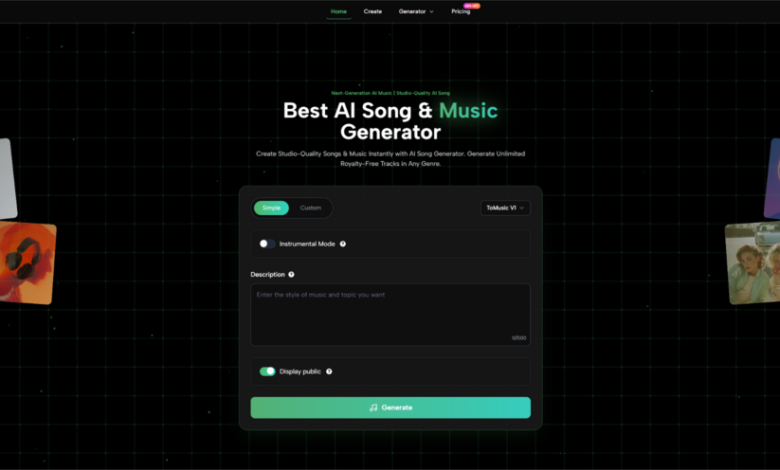
Most music tools are built around editing. ToMusic is built around initiation. On the homepage and creation page, the interface centers on a prompt box, a mode switch, model selection, and an instrumental option. That design quietly tells you what the product believes music creation starts with: not mixing, but direction.
Why Prompting Feels More Natural Than Arrangement
In Simple mode, the process begins with descriptive text. The official explanation says Simple mode is for users who want to describe style, mood, and characteristics while the system handles musical decisions. That makes it especially relevant for people who know the outcome they want but do not want to construct the song bar by bar.
Why Structured Input Changes Creative Confidence
Custom mode moves in a different direction. Instead of asking for a broad prompt only, it allows users to write lyrics, define style tags, and control instrumental or vocal settings more precisely. The important difference is psychological as much as technical. A creator who feels vague can begin with Simple mode. A creator who already has wording, sections, or song structure can move into Custom mode without changing platforms.
What This Means For Non-Musicians First
The key advantage is not just convenience. It is permission. Many people can describe a song long before they can produce one. A system that accepts language as a valid musical starting point lowers the barrier in a meaningful way.
Where The Platform’s Real Utility Comes From
A lot of AI music products sound similar in summary, but ToMusic becomes more concrete when you look at the details shown across its pages. The platform presents four models, supports vocal and instrumental creation, and highlights licensing, format downloads, and stem-related tools inside the pricing and feature descriptions.
How The Model Layer Shapes Expectations
The creation page describes the platform as giving access to ToMusic V1, V2, V3, and V4. Based on the official wording, each model emphasizes different strengths. V4 is framed around stronger vocal expression, V3 around richer harmonies, and the broader model lineup around different trade-offs such as speed or longer compositions.
From a practical standpoint, this matters because it avoids the common AI problem of pretending one model fits every need. In my view, a creator making ad music, social content, or demo concepts does not always want the same thing. Sometimes speed wins. Sometimes arrangement density matters more. Sometimes the vocal feel is the real decision point.
What Instrumental Mode Quietly Solves
Instrumental mode may sound like a minor toggle, but it expands the product beyond “AI songs” into a wider production category. Background tracks, study music, podcast beds, and lightweight soundtrack work all become realistic use cases when lyrics are optional. The official copy explicitly points to instrumental creation for background music, soundtracks, and study tracks, which gives the feature a broader role than a simple on-off setting.
How The Official Workflow Actually Works
One reason the product is easy to explain is that the visible workflow is short. Based on the creation interface and its supporting FAQ, the usable path stays within a few steps rather than disappearing into hidden settings.
Step One Starts With Mode And Model
First, choose whether you want Simple mode or Custom mode, then select a model from the available ToMusic lineup. This determines whether you are giving the system a descriptive brief or a more structured lyrical and stylistic input.
Step Two Defines The Musical Intent Clearly
Next, add the actual creative material. In Simple mode, that means a description of style, mood, or characteristics. In Custom mode, that means lyrics, style tags, and any structure cues you want to make explicit. The platform also indicates that lyric-based generation can interpret tags such as verse, chorus, intro, and outro.
Step Three Decides Voice Or Pure Instrumental Output
Then choose whether the piece should remain instrumental or include vocals. This is a small setting with a large effect, because it changes the role of the final output from song to soundtrack.
Step Four Generates And Refines Through Repetition
Finally, generate the track and iterate. The site presentation suggests a workflow where output is not treated as a single irreversible result. Instead, it is something you compare, refine, and regenerate by adjusting input quality, style detail, or model choice.
Why Language-Based Music Creation Feels Timely
The broader appeal of Text to Music is not difficult to understand. More creators now work in content environments where speed and variation matter as much as perfection. A short-form video creator, an indie game builder, a marketing team, and a student making a presentation soundtrack all benefit from being able to move from brief to audio without a full production chain.
The Product Fits Multi-Format Creative Work
On the official pages, ToMusic repeatedly positions itself around content creation, advertising, podcasts, games, film scores, and social media. That range is important because it suggests the platform is not trying to live in only one category. It sits somewhere between songwriting aid, soundtrack generator, and fast-turnaround creative utility.
Licensing Changes Whether Output Is Actually Usable
One of the more practical details on the site is commercial usage language. The platform states that generated music comes with commercial usage rights and royalty-free licensing, and the pricing comparison also includes commercial license support. That is not a poetic feature, but it is one of the differences between something people test for fun and something they can actually use in a client workflow.
What The Product Looks Like In Real Use
The easiest way to understand the platform is to compare how its modes and plans shape likely usage decisions.
| Decision Area | What ToMusic Shows | Why It Matters |
| Input method | Simple mode and Custom mode | Supports both fast ideation and controlled lyric-based creation |
| Model choice | V1, V2, V3, V4 | Lets users choose between different strengths instead of one default path |
| Output type | Vocal or instrumental | Expands use cases from songs to background music and soundtracks |
| Access level | Free, Starter, Unlimited | Makes it possible to test first and scale later |
| Usage rights | Commercial license listed | Improves viability for creator and business workflows |
That table is where the product becomes easier to judge fairly. It is not just “AI makes music.” It is a system that lets users choose how much structure they want to bring into the process.
What Makes Lyrics More Than Just Input Text
The most interesting part of the platform may be its treatment of lyrics. On the creation page, ToMusic explains that Custom mode supports user-written lyrics and that different models support different lyric capacities, with V1 listing a 3000-character limit while V2 to V4 handle extended lyrics. That matters because it tells users the lyric box is not decorative. It is central to how the system is expected to be used.
Lyrics Become A Creative Control Surface
That is where Lyrics to Music AI becomes more than a catchy phrase. When lyrics, tags, and section labels can shape the output, words begin acting like lightweight production instructions. For writers who think in lines, scenes, or choruses before they think in stems and plugins, that is a meaningful shift.
This Does Not Remove The Need For Judgment
At the same time, the platform still depends on input quality. In my view, that is one of the most honest ways to talk about tools like this. Better prompts usually produce more coherent direction. Better lyrics usually produce more usable songs. And some generations will still require repetition, because musical interpretation is never completely mechanical.
Where The Limits Still Need To Be Acknowledged
A restrained view makes the product easier to trust. ToMusic does not eliminate taste, and it does not guarantee that the first output will be the one you publish. Results will vary by model, lyric structure, and prompt clarity. Users looking for very specific production nuances may still need several passes before getting close to their target.
That is not really a weakness unique to this platform. It is the trade-off of language-first music generation itself. You gain speed and accessibility, but you also accept that direction must sometimes be refined through iteration rather than direct manual control.
Why This Category Feels Bigger Than One Tool
What ToMusic captures well is a broader change in creative software. More tools now begin by asking what you want, not how technically skilled you are. That may be the most important idea behind the platform. It treats description as a serious creative asset.
If that design direction continues, the future of music software may feel less like operating a machine and more like briefing a collaborator. ToMusic does not replace musicianship, but it does suggest a new entry point for it. And for many creators, that is the difference between thinking about music and actually finishing a track.