For many creators, music is the part of a project that feels exciting in theory but difficult in practice. You may have lyrics, a mood, a short video concept, a podcast intro, or a brand idea, yet turning that into a complete track usually requires songwriting knowledge, arrangement skills, production tools, and time. That is where AI Song Generator becomes interesting: it offers a more accessible way to move from a written idea or lyric draft toward a playable song without asking the user to understand every technical layer of music production.
This does not mean AI music generation is effortless magic. The quality still depends heavily on how clearly you describe the style, mood, lyrics, tempo, and intended use. In my view, the real value is not that it replaces musicians, but that it lowers the first barrier. It gives writers, creators, marketers, and hobbyists a way to hear an idea quickly, test different directions, and decide whether a song concept is worth developing further.
A Practical Bridge Between Lyrics And Music
The strongest appeal of this kind of platform is that it treats music creation as a guided workflow rather than a blank studio screen. Instead of starting with instruments, software plugins, or mixing panels, users begin with language: a song title, lyrics, style notes, genre direction, emotional tone, vocal preference, tempo, or an instrumental option.
That makes the tool especially useful for people who can express a feeling but cannot easily translate that feeling into melody, harmony, arrangement, and vocal direction. The platform’s pages describe a process where the AI analyzes text, lyrics, rhythm, emotion, style, and other creative signals before generating music around them. In practical terms, the user provides the creative brief, and the system attempts to convert that brief into a structured audio result.
Why Text Becomes The Creative Starting Point
Text is a natural entry point because most non-musicians already think in scenes, stories, moods, and references. A creator might know they want something nostalgic, cinematic, upbeat, lonely, romantic, or energetic long before they know what chord progression or drum pattern would support that feeling.
This is where the platform’s design feels approachable. It allows users to describe what they want in ordinary language, while also giving more specific controls such as genre, mood, voice, tempo, lyrics, and instrumental mode when needed.
Creative Control Still Depends On Clear Prompts
The most important thing to understand is that better input usually leads to better output. A vague request like “make a good pop song” may produce something usable, but a more specific direction will usually give the system a clearer target.
For example, a user may get more focused results by describing the emotional setting, intended platform, vocal style, and song energy. The AI can generate quickly, but the user still shapes the outcome through prompt quality and iteration.
How The Official Workflow Actually Feels
The AI Song Maker official workflow is built around a simple idea: choose the type of music task, enter the needed creative information, generate the result, then listen and revise if needed. It is less like traditional music software and more like a guided creative form.
That simplicity matters because many people who need music are not trying to become producers. They may need a background track for a video, a demo from lyrics, a podcast intro, a game loop, or a quick song concept. A direct generation flow helps them move from intention to audio without getting stuck in technical setup.
Step One: Choose The Song Creation Mode
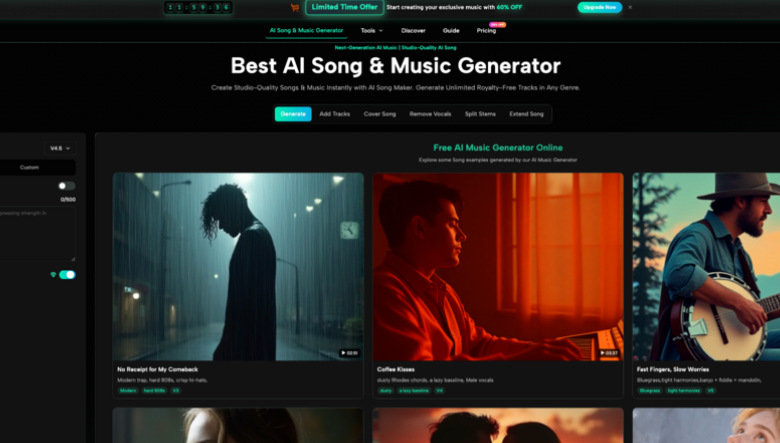
The first step is deciding what kind of result you want. Based on the site’s visible tool structure, users can work with lyrics-to-song creation, general AI music creation, instrumental generation, vocal removal, stem splitting, song extension, and related music tools.
This matters because not every project starts from the same place. Some users already have lyrics. Some only have a mood. Some need an instrumental background track. Others may want to remove vocals or extend an existing song idea.
The Best Mode Depends On Your Starting Material
If you already have lyrics, the lyrics-to-song route is the most natural. If you only have a concept, the AI music creator path is more flexible. If you are making background music for a video or presentation, instrumental generation may be more suitable.
Choosing the right mode first reduces unnecessary trial and error. It also helps the system understand whether the priority is vocal delivery, arrangement, background atmosphere, or audio utility.
Step Two: Enter Lyrics, Style, And Mood Details
The second step is where the creative direction becomes more concrete. Users can provide a title, lyrics, style, genre, mood, voice direction, tempo, and related settings. The site also presents options such as Simple and Custom modes, which suggests that users can either keep the process lightweight or provide more detailed instructions.
This is the part of the process where the user’s taste matters most. The AI can generate the song, but it still needs direction about what the song should feel like and how it should function.
Specific Details Usually Create Better Results
A stronger input might include the purpose of the song, the emotional arc, the desired vocal tone, and the genre direction. For instance, a creator making a short video soundtrack may want a bright, energetic, modern pop feeling, while someone turning personal lyrics into a song may prefer a slower, intimate vocal style.
The tool appears designed to support both casual and more controlled creation. Beginners can start simply, while experienced users can add more specific details to guide the output.
Step Three: Generate, Listen, And Adjust
The third step is to generate the track and listen carefully. This is where expectation management becomes important. The first result may capture the overall mood, but it may also need adjustment if the vocal delivery, pacing, structure, or genre balance does not match the user’s intention.
The practical workflow is not just “generate once and finish.” A more realistic approach is to treat each generation as a draft. Listen, notice what works, refine the prompt or lyrics, and generate again if necessary.
Iteration Makes The Experience More Realistic
In my testing with AI creative tools in general, the best results usually come from small refinements rather than expecting perfection on the first attempt. Music is especially sensitive because melody, rhythm, voice, and arrangement all need to feel coherent together.
This is why the platform’s ability to save generated songs in a user library is useful. It gives users a way to compare versions, return to earlier results, and manage different creative directions without losing track of their work.
Where This Tool Fits Into Real Creation
The platform is most useful when speed, experimentation, and accessibility matter. It is not necessarily the same as hiring a composer or producer for a high-budget commercial release, but it can be highly useful for demos, content production, early-stage ideation, and creator workflows.
For many users, the biggest benefit is hearing an idea quickly. A lyric that sits silently in a document can feel unfinished. Once it becomes audio, even as a draft, the creator can judge the mood, pacing, and emotional direction more clearly.
Useful Scenarios For Different Creators
The tool can support several practical use cases: social video background music, podcast intros, YouTube segments, personal songwriting drafts, game music sketches, advertising concepts, and presentation soundtracks.
It is especially helpful for people who need original-sounding music frequently but do not want to search endlessly through stock music libraries. Instead of adapting a project to an existing track, they can generate music around the project’s own mood and concept.
Commercial Claims Should Be Read Carefully
The platform presents generated music as royalty-free and suitable for commercial use. That is a useful positioning for creators, especially those working on monetized videos, ads, games, or social content.
Still, it is wise to keep records of generated tracks, prompts, usage terms, and project context. AI music copyright and licensing practices continue to evolve across the industry, so creators should treat commercial use as something to manage responsibly rather than ignore completely.
See also: Advancing Patient Care Through Modern Infusion Technologies
A Clear Comparison Against Traditional Options
A simple comparison helps show where the product’s strengths are strongest. Its advantage is not that it beats every professional workflow, but that it gives ordinary users a faster and more approachable way to start.
| Creation Method | Best For | Main Strength | Main Limitation |
| AI Song Generator workflow | Lyrics, concepts, demos, creator music | Fast idea-to-song generation with guided inputs | Results may need several prompt revisions |
| Stock music library | Quick background tracks | Easy to browse and license existing music | Music may feel generic or overused |
| Professional composer | Custom high-value production | Highest creative control and human judgment | More time, budget, and communication required |
| Traditional music software | Producers and musicians | Deep editing and production control | Steep learning curve for beginners |
| Basic audio editing tools | Cutting, arranging, small edits | Useful for polishing existing audio | Cannot easily create a full song from text |
This comparison makes the product’s role clearer. It works best as a creative accelerator. It helps users test ideas, produce drafts, and generate usable music directions quickly, while still leaving room for human judgment and refinement.
Why The Product Feels Accessible
The product feels accessible because it begins with the user’s idea instead of technical production knowledge. That is an important difference for non-musicians.
A creator does not need to understand arrangement layers, mixing chains, or vocal processing before starting. They can describe what they want, choose relevant options, and then decide whether the generated result fits the project.
Accessibility Does Not Remove Creative Judgment
Even with a simple interface, the user still needs to listen critically. Some generations may feel too generic, too busy, too slow, or slightly mismatched to the lyrics. That does not mean the tool failed; it means the process benefits from revision.
The best users will likely treat it as a partner for exploration rather than a one-click replacement for taste. The more clearly they guide the system, the more useful the results become.
Limitations That Make The Experience More Believable
It is important to describe the limits honestly because that makes the recommendation more trustworthy. AI music generation is powerful, but it is not perfectly predictable. The same idea can produce different results, and small prompt changes may shift the musical direction.
Lyrics may also need adjustment before generation. Lines that look good on a page may not always sing smoothly. A chorus may need simpler phrasing, a verse may need tighter rhythm, or the emotional tone may need clearer wording.
Prompt Quality Can Change The Final Track
The final quality depends heavily on prompt clarity, lyric structure, style selection, and how well the user communicates the desired outcome. A weak prompt can lead to a track that feels unfocused, while a strong prompt gives the AI more useful creative boundaries.
This is why users should expect some experimentation. The platform can shorten the path from idea to audio, but it does not remove the need to shape the idea.
Multiple Generations May Be Necessary
In many cases, generating several versions is the most practical approach. One version may have better vocals, another may have a stronger instrumental feel, and another may match the mood more closely.
That iterative process is not a weakness. It is closer to how creative work often happens: draft, listen, compare, revise, and improve.
AI Song Generator As A Creative Starting Point
The most balanced way to understand the platform is as a creative starting point for modern music needs. It helps users turn written ideas, lyrics, moods, and project briefs into listenable tracks without requiring a full studio workflow.
For creators who need quick music ideas, personal song drafts, background tracks, or early demos, this can be genuinely useful. It gives people a way to hear possibilities instead of only imagining them. The better the input, the better the chance of getting a result that feels close to the original intention.
A Sensible Tool For Testing Musical Ideas
Its real strength is not simply automation. Its real strength is fast exploration. A user can test whether a lyric has emotional weight, whether a mood fits a video, or whether a song concept deserves further development.
That makes it valuable for creators who want to move quickly but still care about direction, tone, and usability.
The Best Results Still Need Human Taste
The tool can generate the music, but the user decides what feels right. That human layer remains important. A good result is not just technically complete; it needs to fit the story, audience, scene, or emotional purpose behind the project.
Used with realistic expectations, the platform can be a practical and inspiring part of the creative process. It turns music creation from something distant and technical into something more immediate, testable, and open to experimentation.